Showing posts with label Unit 20. Show all posts
Tuesday, 28 April 2020
Unit 20: P5 - post-production and evaluation
P5 is all about the post-production, i.e everything that you do after you have finished putting all your sound files together in a rough and ready way. We're talking transitions such as fades, changing volume, and adding vox pops and musical stings. Really, there's not a whole lot of post-production to be done when making a podcast!
One thing that is really important about P5 are the two evaluations you have to write. These are distinction criteria, and they allow you to demonstrate the things you have learned and the techniques you have used to get there.
This is where you evaluate the rough cut that you made for P4. You should be really harsh about your rough cut, because you're going to be solving all of these issues! Here are some issues that you may run into:
One thing that is really important about P5 are the two evaluations you have to write. These are distinction criteria, and they allow you to demonstrate the things you have learned and the techniques you have used to get there.
aM3D2) Rough cut evaluation
This is where you evaluate the rough cut that you made for P4. You should be really harsh about your rough cut, because you're going to be solving all of these issues! Here are some issues that you may run into:
- The sound quality is poor, and you need to re-record certain bits
- There's not enough background music
- It's too long and a little boring
- It isn't completely clear what the podcast is about
- You need to add an interview or something similar to make it longer
bM3) Feedback from another person
Play your podcast to somebody else. What feedback do they give you? Jot down some bullet point ideas here.
cM3D2) Effects and transitions
Here you point out all the awesome and cool things that you did making your podcast better. Did you change the volume? Did you add a fade out? Write about it here, and, most importantly, include screenshots!
dM3D2) Evaluation of final production
Here, you should evaluate your final, absolutely done podcast. Unlike the first evaluation, you should be overwhelmingly positive about your podcast. So why is it so good? Why are people going to want to listen to it? What did you learn? And (keep this bit brief), what would you do differently if you had better resources?
Once more, remember to look at the exemplar powerpoints in the submissions folder. These will give you a really good idea about how to construct your podcast, and how to evaluate it!
Friday, 24 April 2020
Unit 20: P4 - production
P4 is where you place evidence of you producing, i.e making your podcast. It's here where you place a link to your raw audio files, and place screenshots of you working in Audacity or Audition.
Let's go through it step by step:
On this slide, you place a link to the audio files that you made your podcast out of. You should also include a screen capture of the raw files sitting in your folder, which should look a little bit like this:
My advice is is that if you are dithering over starting your podcast, just give it a go. Your first recording will be terrible anyway and you will almost certainly end up re-recording it, so get the rough draft done and dusted!
Let's go through it step by step:
a) Audio files
On this slide, you place a link to the audio files that you made your podcast out of. You should also include a screen capture of the raw files sitting in your folder, which should look a little bit like this:
![]() |
| This is actually a bunch of songs from a techno album but you get the general idea |
b) Revised edit decision list
This is where you include a list of the decisions and changes you made after you started to record your podcast. It's completely fine to make changes from your original plan, but just include them of this slide. Below is an example of what this might look like:
cM2D1) Account of production techniques
On this slide, describe how you recorded your podcast. For example,
- Where did you put the mic?
- What room did you record in?
- Why?
- How did you prevent any issues from happening?
- What techniques did you use to get the best sound?
- Was your sound terrible first time, and did you have to re-record it?
It would be good to have an image here of what your recording situation looked like. Make sure you put lots of detail in to this slide, as it contributes towards Distinction criteria.
d) Equipment photo
On this slide, include an image of the equipment you used. This will probably involve an image of your phone, microphone, and/or computer.
It's not a very exciting slide.
e/M2D1) Raw files
On this slide, you include a link to your rough cut. Yes, I know it says 'raw files', but it's too late to change that. Maybe you should change this slide to say 'rough cut'
Tuesday, 21 April 2020
Unit 20: P2 and P3 - paperwork
P2 and P3 for Unit 20 are all about paperwork. You will have done this before at least once for your other units.
However, since you are working in a workbook, you may wish to create your own versions. The easiest way to do this is to click insert, then select table, then select the size of the table you want to create. See below for how to find this option.
You can find all the forms documents you need by clicking here.
However, since you are working in a workbook, you may wish to create your own versions. The easiest way to do this is to click insert, then select table, then select the size of the table you want to create. See below for how to find this option.
Below is a student example (thanks AL!) for a risks and hazards slide. Since you will be working from your own home, there's not likely to be many hazards, so you may need to use your imagination!
Here's a rundown of all the elements of P2 and P3.
Recce
Recce is (sort of) short for 'reconnaissance', a military term involving scouting out a place before you actually go there. For this activity, you will be completing a recce of your home. Please do not leave your home! Podcasts, while important, definitely do not come under essential work...
Risks and hazards
What issues and dangers might there be when making your podcast? Mild risks and hazards include
- Background noise
- People walking in when you are recording
- Tripping over wires
- Dropping your phone and breaking it
- Spilling coffee on your computer
Solutions to risks and hazards
Here you present solutions to the issues you presented in the last slide. For example, as you can see in the above image, in my office/cupboard under the stairs, I am undertaking the risky behaviour of drinking a coffee and leaving it on my computer. However, I have solved this risk by putting the coffee in a mug with a lid on it.
TOP TIP - you can the risks & hazards and the solutions on the same slide!
Legal and ethical
Legal and ethical is a bit more serious. Again, you've done this before, but as a reminder:
Legal issues break the law.
They include copyright infringement (using songs without people's permission) and breaking and entering in to a location. Don't do these things!
Ethical issues may offend or upset people
These include subject matter, for example making a show about drugs (please do not do this), or libel, which is making an untrue claim about someone.
In fact, if taken to court, libel can be a legal issue also!
It is unlikely you will be breaking the law when making this podcast. One thing to remember is that you are legally allowed to use short amounts of copyrighted music under what is known as the fair use policy. But it's even better to use non-copyrighted music
Talent release
If you have someone in your podcast who is not you, you should use a talent release form. You can download an example of one by clicking here. You do not need to print this, but can get the person to 'sign' their name by writing it in block capitals.
Thursday, 26 March 2020
Unit 20: P1 - planning and preparation
P1 is all about planning and preparation. It's similar to other P1's you have already done in other units. It's here that you present your research, and other essential documents like recces and risks and hazards.
Let's go through P1 step by step:
Create a new slide called 'research' if you do not have one already. It's here that you can put your podcast research that you completed in the last activity, which you can find here.
If you need to spread this over more slides, just make more slides!
Here's a piece of 'scrap paper' where you can jot down all of the ideas you have for this unit. It's good to keep all of your ideas together, just in case you forget them later.
This is where you include information about your podcast! Use the following headings:
Music
e)
Let's go through P1 step by step:
Research
Create a new slide called 'research' if you do not have one already. It's here that you can put your podcast research that you completed in the last activity, which you can find here.
If you need to spread this over more slides, just make more slides!
Ideas sheet
Here's a piece of 'scrap paper' where you can jot down all of the ideas you have for this unit. It's good to keep all of your ideas together, just in case you forget them later.
a) Info sheet
This is where you include information about your podcast! Use the following headings:
- Genre (the one you emailed to me)
- Style (formal, informal, interview, discussion etc....)
- Sound (what music are you going to include?)
- Content (what's going to be in your podcast? Who's going to be talking? Are you going to interview anyone? Are you going to have any phone-ins or competitions?)
b/M1) sound script
This is where you include a script of what you are going to say in the podcast. This script is just a guideline, and you can go off script as much as you like. Think of it as a guideline rather Check out the exemplars in the drive for how you can do this.
c/M1) Asset plan
This is a list of all the assets you will include. These include:
Music
Sound effect
Vox pops (short 'sound bytes' of people talking)
For copyright reasons, you are only allowed to include short (less than ten seconds) bits of commercial music.
You can also use copyright free music, which you can find at this site for example (there are loads of other sites)
d/M1) Production schedule
A production schedule is a timetable of when you are going to do what. Here's a simple example from one of the exemplar powerpoints:
Here are some examples that you can pop on to your production schedule
Email teacher with final idea for podcast
Produce sound script
Download Audacity and make sure it works
Do microphone check, and upload file on the drive
Download music to use on blog
Complete legal and ethical and risks and hazards documents
Record podcast
Record interview
e) Audition screengrabs and Audacity tutorial
First of all, most of you will be using Audacity for this project! However, if your computer can run Audition, then it's now been made free in the UK due to the Covid-19 Pandemic. Please see emails from IT and the college for how to get it at home.
For these slides, you will be teaching yourself how to use Audacity. If you need to use more than one slide, that's fine, don't try and cram it all on to one slide!
First of all, install Audacity using the link from the last session. It should look a little like this.
Next, hit the red 'record' button and say something stupid in to the mic. If you're lucky, it will work first time. If not, you may have to select your microphone from the drop down menu.
Hit the stop button when you're done.
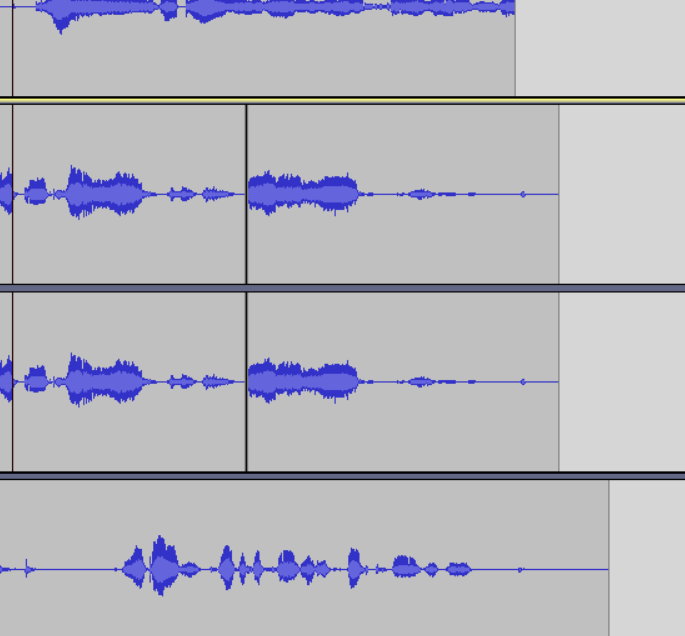
Next you're going to add a new track. Click track/add new/stereo track. Now you can record a simultaneous track. It's like you can have a conversation with yourself!
In order to move audio around in Audacity, drag to highlight the bit you wish to move and hit Ctrl + X
Then select where you want to place it, and hit Ctrl+V
Next, we are going to add some music. Click file/import/audio, and select a song from your computer
The song will be imported in to a new channel!
You can cut (Ctrl+X) and paste (Ctrl+V) to stitch audio together
You can also add effects by clicking and dragging to select the part of the track you want to add an effect to, then clicking effects/fade in, for example
Audacity is simple and straightforward, but you must mess around with it before you record anything properly! Spend some time making stupid recordings and adding stupid effects, and make screenshots to put in your powerpoint!
Unit 20: Research and tech tests
First of all, please be patient with me and this unit. There are a few things that need to be hammered out, including exactly what software we are going to use to edit this. However, and I would like to make this very clear: please do not worry. We are all in exactly the same situation, and allowances will definitely be made for technical issues. We are going to create the very best podcasts we possibly can, on a subject that you love. While I expect you to work hard and to do your very best, this is a strange situation! If you have any questions about this, including questions that have nothing to do with media diploma, please email me and I will do my best to help you out. It's what I am here for.
Your goal for this unit is to record a 3-5 minute long podcast. We have chosen this unit, as the only equipment you need for this unit is either a phone or a computer with a microphone. We understand that this may not be possible for everyone, but it is the very best we can offer in this situation. Please contact me quickly and I will inform you of contingency measures. I will send you information about free software to edit sound. Most computers come pre-installed with sound editing software anyway.
0 - Check out the exemplar PowerPoints
You can find three exemplary unit 20 powerpoints in the unit 20 submission folder. Check them out. Look at what the students have done for each slide. You'll notice it's quite a straightforward unit. There will be some changes we will have to make. Not all of you will be using audition. In fact, most of you will be using a MUCH more straightforward program. So that's a relief! This will not affect your mark.
1 - Click the new submission link
You can find it by checking your emails
As long as you are signed in to your google account, you will be able to access it. We need a new submission link as some people do not have access.
2 - Email me the subject for your podcast.
In my last email I gave you a big list of possible themes and subjects for your podcast. Please email me telling me what you would like your podcast to be about!
3 - Submit your unit 20 powerpoint, with six analyses of the podcasts you have listened to so far
Find six podcasts for subjects YOU are interested in, and make notes under the following headings:
- Genre
- Style
- Sound
- Content
There are podcasts about absolutely everything and anything. So you simply need to google anything you are interested in, followed by the word 'podcast'
here's a few examples
- UK hiphop podcast
- Retro video game podcast
- Anime podcast
- Fashion podcast
- Classic cars podcast
Please place your notes, including the names of the podcasts under the INFO SHEET slide on the powerpoint workbook, which can again be found in the unit 20 folder of the drive.
4 - Download audacity, and record yourself saying "hey guys, lets record some podcasts"
Audacity is a small and easy tool for recording podcasts. You can download it here. https://www.audacityteam.org/download/
Once it has been set up, hit record, say "hey guys, lets record some podcasts", then hit stop. Next, click file, export, mp3, then save it somewhere good. Then drag and drop the file in to your submissions folder on drive. - Note: for the final project, you can use Audition, but I will email you details on how to achieve this later
Important note: if you have any issues with these tasks, please do not worry! but you must let me know!
Here are a few examples of podcasts to check out if you need some inspiration. Remember: there's no limit on what you want to talk about, so they're very different from each other!
Please remember, no matter how obscure your interests are, you can find a podcast on it by googling '{your interest} podcast'
Subscribe to:
Posts (Atom)